2023년 12월 20일 수요일

css - CSS / 표(table) 꾸미기 / 틀 고정(행 또는 열 고정) 만들기


엑셀에 틀 고정이라는 기능이 있다. 틀 고정을 사용하면 상하 또는 좌우로 스크롤해도 항상 보이는 행 또는 열을 만들 수 있다. CSS로도 같은 효과를 낼 수 있다. 이를 구현하기 위해 사용하는 속성은 display: sticky이다.

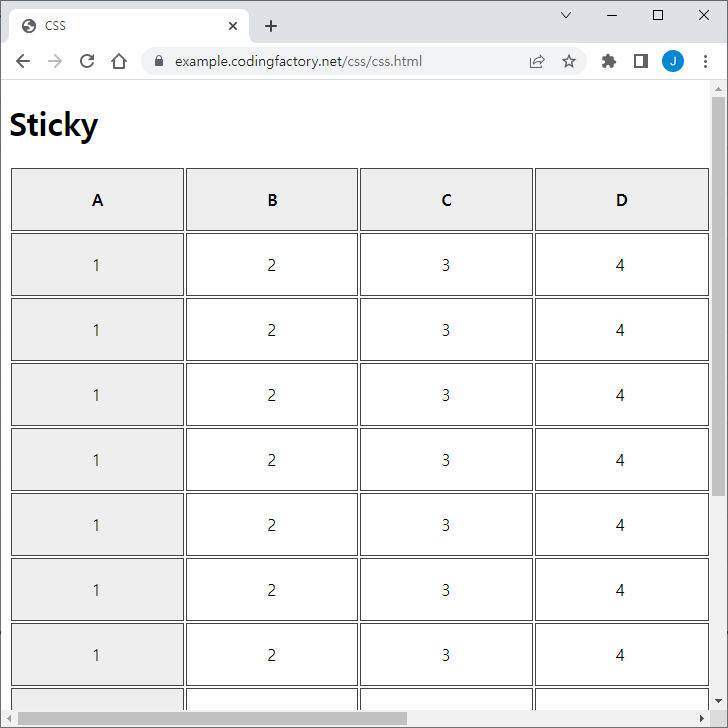
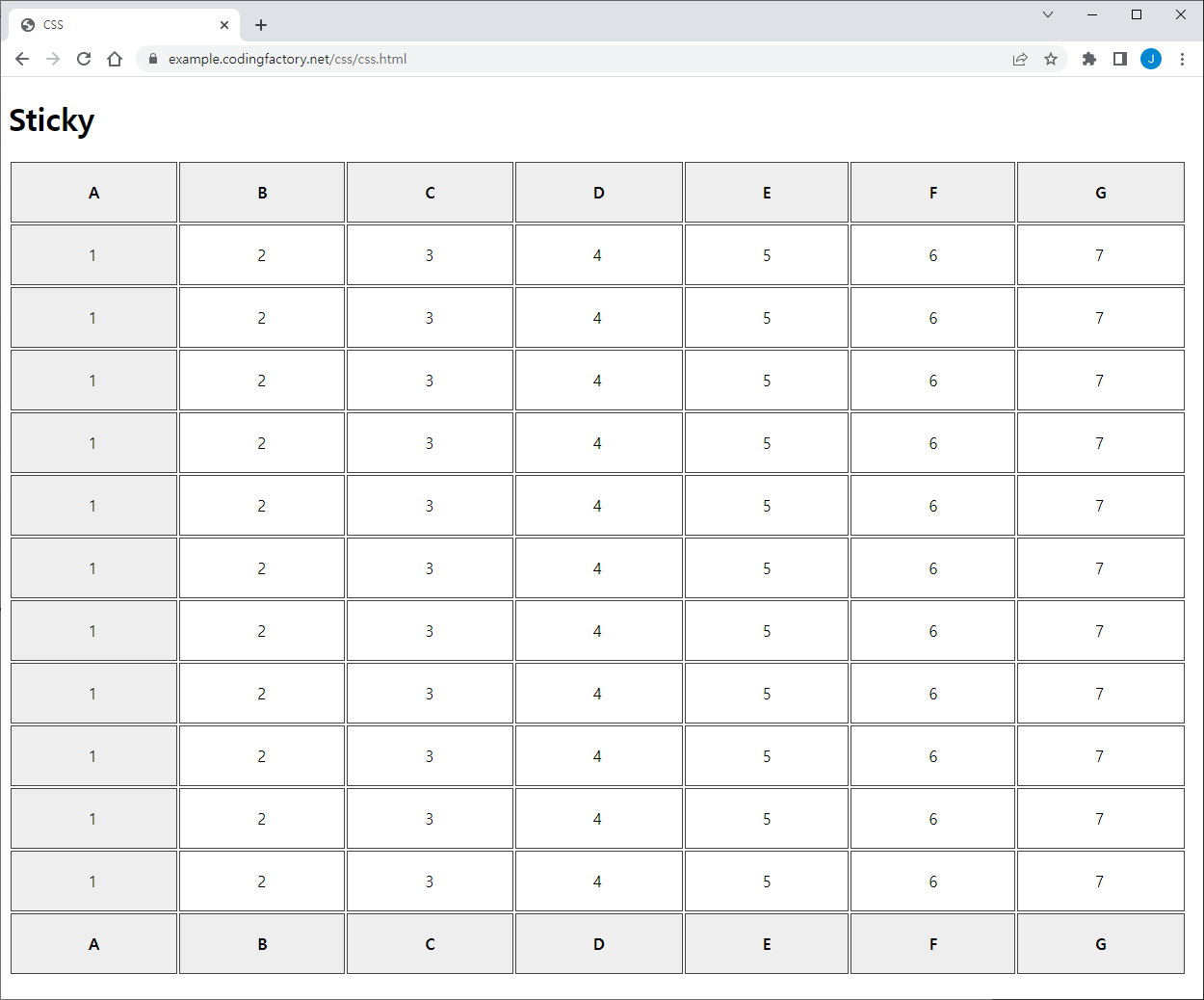
예를 들어 다음과 같은 표가 있다고 하자.

<!doctype html>
<html lang="ko">
<head>
<meta charset="utf-8">
<title>CSS</title>
<style>
table#jb-table th, table#jb-table td { padding: 20px 80px; border: 1px solid #444444; }
table#jb-table th { background-color: #eeeeee; }
table#jb-table tbody tr td:first-child { background-color: #eeeeee; }
</style>
</head>
<body>
<h1>Sticky</h1>
<table id="jb-table">
<thead>
<tr>
<th>A</th><th>B</th><th>C</th><th>D</th><th>E</th><th>F</th><th>G</th>
</tr>
</thead>
<tbody>
<tr>
<td>1</td><td>2</td><td>3</td><td>4</td><td>5</td><td>6</td><td>7</td>
</tr>
<tr>
<td>1</td><td>2</td><td>3</td><td>4</td><td>5</td><td>6</td><td>7</td>
</tr>
<tr>
<td>1</td><td>2</td><td>3</td><td>4</td><td>5</td><td>6</td><td>7</td>
</tr>
<tr>
<td>1</td><td>2</td><td>3</td><td>4</td><td>5</td><td>6</td><td>7</td>
</tr>
<tr>
<td>1</td><td>2</td><td>3</td><td>4</td><td>5</td><td>6</td><td>7</td>
</tr>
<tr>
<td>1</td><td>2</td><td>3</td><td>4</td><td>5</td><td>6</td><td>7</td>
</tr>
<tr>
<td>1</td><td>2</td><td>3</td><td>4</td><td>5</td><td>6</td><td>7</td>
</tr>
<tr>
<td>1</td><td>2</td><td>3</td><td>4</td><td>5</td><td>6</td><td>7</td>
</tr>
<tr>
<td>1</td><td>2</td><td>3</td><td>4</td><td>5</td><td>6</td><td>7</td>
</tr>
<tr>
<td>1</td><td>2</td><td>3</td><td>4</td><td>5</td><td>6</td><td>7</td>
</tr>
<tr>
<td>1</td><td>2</td><td>3</td><td>4</td><td>5</td><td>6</td><td>7</td>
</tr>
</tbody>
<tfoot>
<tr>
<th>A</th><th>B</th><th>C</th><th>D</th><th>E</th><th>F</th><th>G</th>
</tr>
</tfoot>
</table>
</body>
</html>

웹브라우저 창 크기가 충분히 크면 모든 내용을 볼 수 있으나...

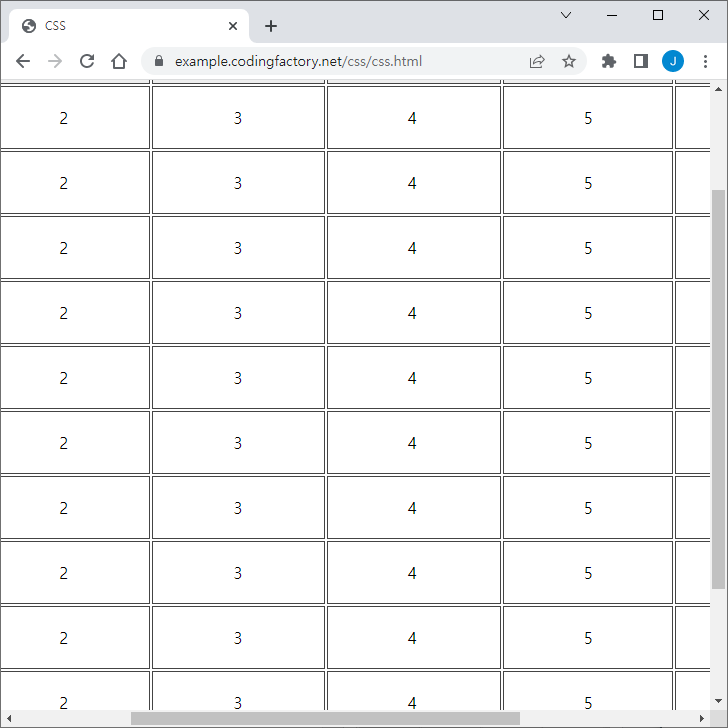
그렇지 않은 경우 상하좌우 스크롤이 생긴다.

내용을 보기 위해 스크롤 하다보면 무엇에 대한 값인지 알 수가 없다.

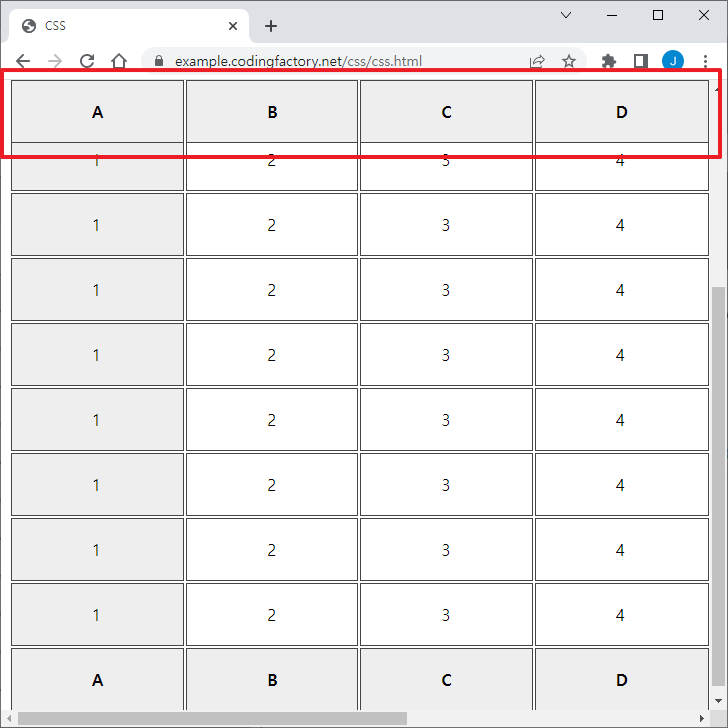
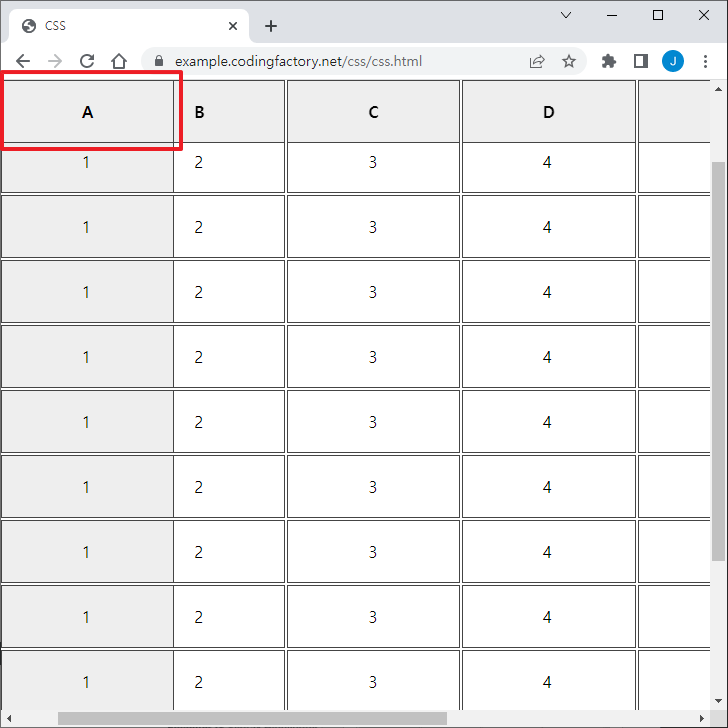
제1행을 고정하고 싶다면 다음 코드를 CSS에 추가한다.

table#jb-table thead { position: sticky; top: 0; }

상하 스크롤을 해도 제1행은 항상 보인다.

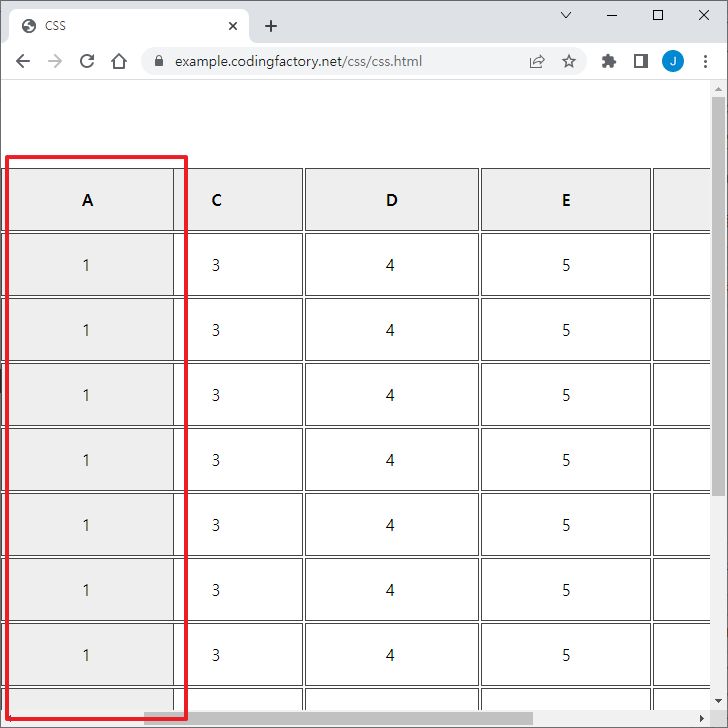
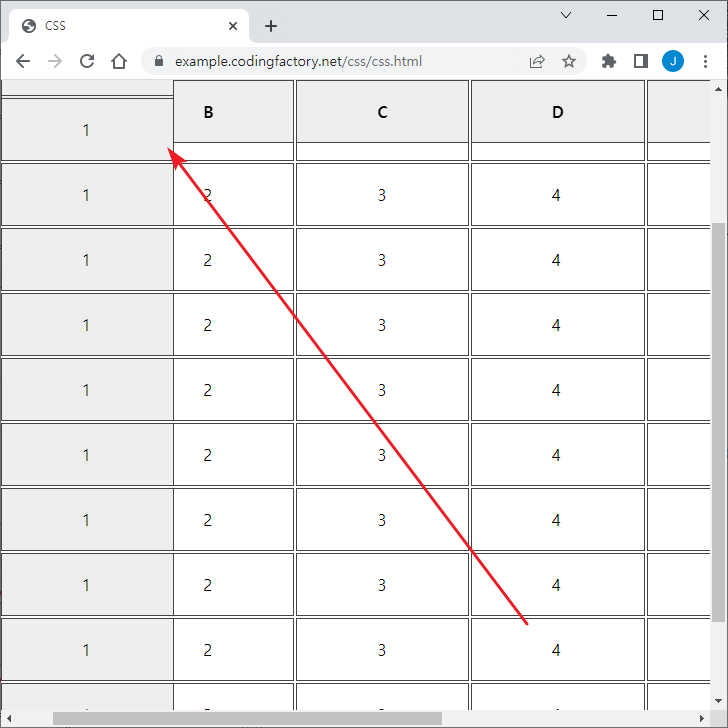
제1열을 고정하고 싶다면 다음 코드를 CSS에 추가한다.

table#jb-table th:first-child,
table#jb-table td:first-child { position: sticky; left: 0; }

좌우 스크롤을 해도 제1행은 항상 보인다.

제1행과 제1열을 고정하기 위해, 위에 사용했던 코드를 다 넣으면...

table#jb-table thead { position: sticky; top: 0; }
table#jb-table th:first-child,
table#jb-table td:first-child { position: sticky; left: 0; }

제1행 제1열의 셀이 가려지게 된다.

이를 해결하는 방법은 z-index를 추가하는 것이다.

table#jb-table thead { position: sticky; top: 0; z-index: 1; }
table#jb-table th:first-child,
table#jb-table td:first-child { position: sticky; left: 0; }

이제 상하좌우 스크롤을 해도 제1행과 제1열은 항상 보인다.

마지막 행도 고정하고 싶다면 다음과 같이 한다.

table#jb-table thead { position: sticky; top: 0; z-index: 1; }
table#jb-table th:first-child,
table#jb-table td:first-child { position: sticky; left: 0; }
table#jb-table tfoot { position: sticky; bottom: 0; }

제1열과 제2열을 고정하고 싶다면 다음과 같이 한다. 제2열의 left 값은 제1열의 크기에 맞게 적절히 정한다.

table#jb-table th:first-child,
table#jb-table td:first-child { position: sticky; left: 0; }
table#jb-table th:nth-child(2),
table#jb-table td:nth-child(2) { position: sticky; left: 183px; }


출처 : https://www.codingfactory.net/13033


2023년 12월 18일 월요일

c# - BaseController (Authorization)


로그인을 해야지만 접속이 가능한 Controller에 상속한 BaseController를 만든다. 


1. BaseController.cs

    public class BaseController : Controller
    {
        public string actionName { get; protected set; }
        public string controllerName { get; protected set; }

        protected override void OnActionExecuting(ActionExecutingContext filter)
        {
            
            //로그인 체크
            LogonCheck(filter);

			//DoNotAuthorizeAttribute가 설정되어 있으면 접속권한 체크하지 않는다. 
            if (filter.ActionDescriptor.GetCustomAttributes(true).Any(x => x is DoNotAuthorizeAttribute))
            {
                return;
            }

			//Ajax 호출은 접속권한 체크하지 않는다. 
            if (filter.HttpContext.Request.IsAjaxRequest())
            {
                return;
            }

            //메뉴 권한체크 추가 
            CheckAccessAuth(filter);
        }

        private void LogonCheck(ActionExecutingContext filter)
        {

            if (!isLogin) //session or cookie로 로그인 여부 확인
            {

                var routeDictionary = new RouteValueDictionary { { "action", "Logout" }, { "controller", "Account" } };
                //강제 로그아웃 시킨다. 
                filter.Result = new RedirectToRouteResult(routeDictionary);

                return;
            }
        }

        private void CheckAccessAuth(ActionExecutingContext filter)
        {
            //컨트롤러, 액션
            actionName = filter.ActionDescriptor.ActionName;
            controllerName = filter.ActionDescriptor.ControllerDescriptor.ControllerName;
			
            //로그인 계정정보, controller, action 정보로 접속권한 db 체크 
            if (!CanAccessMenu(loginInfo, controllerName, actionName)) {

                //권한없을 경우는 로그인 말고 다른페이지로 이동
                var routeDictionary = new RouteValueDictionary() { { "action", "NotAuthorized" }, { "controller", "Account" } };
                filter.Result = new RedirectToRouteResult(routeDictionary);
                return;
            }
        }
    }


2. 권한체크 필요한 Controller에서 BaseController 상속받는다. 


    public class NoticeController : BaseController
    {
    
    }


출처 : https://bigexecution.tistory.com/78


C# - Dapper Helper Class #3 (DapperManager 예문)


1. Nuget 패키지 관리자에서 Dapper 설치

.NET Framework에 맞는 버전으로 설치


2. DapperManager.cs

    public class DapperManager
    {
        public string DBConn = "DBNAME";
        public SqlConnection con;

        public DapperManager(DB_StrName eDB)
        {
            DBConn = eDB.ToString();
        }

        private SqlConnection SqlConnection()
        {
            return new SqlConnection(System.Configuration.ConfigurationManager.ConnectionStrings[DBConn].ConnectionString);
        }

        /// <summary>
        /// Open new connection and return it for use
        /// </summary>
        /// <returns></returns>
        private IDbConnection CreateConnection()
        {
            var conn = SqlConnection();
            conn.Open();
            return conn;
        }

        public IEnumerable<T> GetAll<T>(string selectQuery)
        {
            using (var connection = CreateConnection())
            {
                return connection.Query<T>(selectQuery);
            }
        }

        public int GetCount(string selectQuery)
        {
            using (var connection = CreateConnection())
            {
                return connection.Query(selectQuery).Count();
            }
        }
        public T GetByIdx<T>(int idx, string tableName, string idxColumnName = null)
        {
            using (var connection = CreateConnection())
            {
                string columnName = string.IsNullOrEmpty(idxColumnName) ? "idx" : idxColumnName;
                return connection.QuerySingleOrDefault<T>($"SELECT * FROM {tableName} WHERE {columnName} = @Idx", new { Idx = idx });
            }
        }
        public T GetById<T>(string id, string tableName, string idColumnName)
        {
            using (var connection = CreateConnection())
            {
                return connection.QuerySingleOrDefault<T>($"SELECT * FROM {tableName} WHERE {idColumnName} = @Id", new { Id = id });
            }
        }

        public int AddRow<T>(string insertQuery, T entity)
        {
            using (var connection = CreateConnection())
            {
                int affectedRows = connection.Execute(insertQuery, entity);
                return affectedRows;
            }
        }

        public int UpdateRow<T>(string updateQuery, T entity)
        {
            using (var connection = CreateConnection())
            {
                int affectedRows = connection.Execute(updateQuery, entity);
                return affectedRows;
            }
        }

        public int DeleteRow(int idx, string tableName, string idxColumnName = null)
        {
            using (var connection = CreateConnection())
            {
                string columnName = string.IsNullOrEmpty(idxColumnName) ? "idx" : idxColumnName;
                int affectedRows = connection.Execute($"DELETE FROM {tableName} WHERE {columnName} = @Idx", new { Idx = idx });
                return affectedRows;
            }
        }

        public IEnumerable<T> ExecuteProcedure<T>(string storedProcedure, object parameters = null)
        {
            int commandTimeout = 180;

            using (var connection = CreateConnection())
            {
                if (parameters != null)
                {
                    return connection.Query<T>(storedProcedure, parameters,
                        commandType: CommandType.StoredProcedure, commandTimeout: commandTimeout);
                }
                else
                {
                    return connection.Query<T>(storedProcedure,
                        commandType: CommandType.StoredProcedure, commandTimeout: commandTimeout);
                }
            }
        }

    }

3. NoticeDTO.cs

    public class Notice
    {
        public int idx_num { get; set; }
        public string title { get; set; }
        public string contents { get; set; }
        public string file1 { get; set; }
        public DateTime reg_date { get; set; }
        public DateTime mod_date { get; set; }
    }


4. NoticeDA.cs

        #region 공지사항 등록하기
        public static int Add_Notice(Notice notice)
        {
            DapperManager dm = new DapperManager("DBNAME");
            var insertQuery = "INSERT INTO NOTICE(title, contents, file1, reg_Date, mod_date, click_count) VALUES (@title, @contents, @file1, @reg_Date, @mod_date, 0)";
            return dm.AddRow<Notice>(insertQuery, notice);
        }
        #endregion

        #region 공지사항 수정하기
        public static int Update_Notice(Notice notice)
        {
            DapperManager dm = new DapperManager("DBNAME");
            var updateQuery = "UPDATE NOTICE SET title = @title, file1 = @file1, contents = @contents WHERE idx_num = @idx_num";
            return dm.UpdateRow<Notice>(updateQuery, notice);
        }
        #endregion
        
        #region 공지사항 삭제하기
        public static int Delete_Notice(int idx)
        {
            DapperManager dm = new DapperManager("DBNAME");
            return dm.DeleteRow(idx, "NOTICE", "idx_num");
        }
        #endregion
        
        #region 공지사항 가져오기
        public static Notice Get_Notice(int idx)
        {
            DapperManager dm = new DapperManager("DBNAME");
            return dm.GetByIdx<Notice>(idx, "NOTICE", "idx_num");
        }
        #endregion


출처 : https://bigexecution.tistory.com/79


2023년 12월 12일 화요일

MSSQL - 영업일 기준 날짜 만들기 (함수)


* 휴일만 임시 테이블로 관리
* 휴일을 수동으로 관리해야 하는 사항이지만 1년에 한번만 적용하면 끝
* startDate 기준으로 interval 값에 따라 (+)앞에 있는 날짜 (-)뒤에 있는 날짜 만들어짐
* 함수로 만들어 DB에서 호출하여 사용 가능


[기준일로 부터 영업일 수 만큼의 날짜 구하기]

-- select [dbo].[MFUNC_GetWorkDay](getdate(), -3)
-- select [dbo].[MFUNC_GetWorkDay]('20231111', 3)

CREATE FUNCTION [dbo].[MFUNC_GetWorkDay]
(
@startDate date,
@interval int
)
RETURNS INT
AS
BEGIN
--Declare @startDate date, @interval int
--SET @startDate = '20230607' --getdate()
--SET @interval = -3

DECLARE @holidayCalendar TABLE (CalendarDate date NULL)
DECLARE @AddDate date

if @interval is null set @interval = 0

-- 휴일만 등록 (23년, 24년)
insert into @holidayCalendar (CalendarDate)
values ('20230101'), ('20230121'), ('20230122'), ('20230123'), ('20230124')
, ('20230301')
, ('20230505'), ('20230527')
, ('20230606')
, ('20230815')
, ('20230928'), ('20230929'), ('20230930')
, ('20231003'), ('20231009')
, ('20231225')
, ('20240101')
, ('20240209'), ('20240210'), ('20240211'), ('20240212')
, ('20240301')
, ('20240410')
, ('20240505'), ('20240506'), ('20240515')
, ('20240606')
, ('20240815')
, ('20240916'), ('20240917'), ('20240918')
, ('20241003'), ('20241009')
, ('20241225')

--select * from @holidayCalendar

Declare @rCnt int, @cCnt int, @flag int
SET @rCnt = 0
SET @cCnt = 0

If @interval >= 0
set @flag = 1
else
set @flag = -1

set @AddDate = @startDate

while abs(@interval) > @rCnt
begin
set @cCnt = @cCnt + 1
set @AddDate = DateAdd(day,  @cCnt * @flag, @startDate)
if (datepart(dw, @AddDate) = 1) 
OR (datepart(dw, @AddDate) = 7)
OR exists(SELECT CalendarDate FROM @holidayCalendar WHERE CalendarDate = @AddDate)
begin
set @interval = @interval + (1 * @flag)
end
set @rCnt = @rCnt + 1
end

RETURN CONVERT(VARCHAR(10), @AddDate, 112)
END


[기간에 해당되는 영일 수 계산]

REATE FUNCTION [dbo].[fn_GetTotalWorkingDays]
(
    @DateFrom Date,
    @DateTo Date
)
RETURNS INT
AS
BEGIN
    DECLARE @TotDays INT = DATEDIFF(DAY, @DateFrom, @DateTo) + 1;
    DECLARE @TotWeeks INT = DATEDIFF(WEEK, @DateFrom, @DateTo) * 2;
    DECLARE @IsSunday INT = CASE WHEN DATENAME(WEEKDAY, @DateFrom) = 'Sunday' THEN 1 ELSE 0 END;
    DECLARE @IsSaturday INT = CASE WHEN DATENAME(WEEKDAY, @DateTo) = 'Saturday' THEN 1 ELSE 0 END;

    DECLARE @TotWorkingDays INT = @TotDays - @TotWeeks - @IsSunday + @IsSaturday;
    RETURN @TotWorkingDays;
END

GO
MSSQL - Cursor vs Temp Table

#테이블 변수사용의 예 use pubs go declare @tmptable table (     nid int identity(1,1) not null,     title varchar (80) not null ) -- 테이블 변수 선언 inse...